 starting at an initial value of 1:
Disclaimer: Calculator information shown here is for TI-83 calculators. It is possible to adapt these examples for other TI calculators. This information is provided to make computations easier and faster, and is not intended as a substitute for understanding and knowing these methods by hand.
Don't have a graphing calculator? Something else to try: Online Graphing Calculator
Calculators can quickly iterate functions. Start by entering your initial value, then take advantage of the ANS key to create a function to iterate simply by pressing ENTER repeatedly. For example, iterate starting at an initial value of 1:
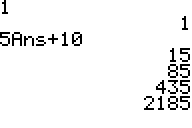
Interpret the calculator: initial value is 1, the next is 15, and so on. 2185 is the fourth iteration.
Here is another example, starting at 0.8.

In this case, the long term behavior of the updating function is tending toward 0. (Be sure to round carefully with a calculator, and interpret all results before blindly copying them down.)
Newton's Method works best with a computer or calculator that can do the iterations quickly. Remember that the most important thing is making sure you can use Newton's Method: making sure that your equation is of the form f(x)=0.
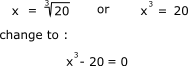
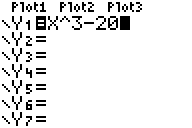
The first step to Newton's Method is to enter f(x) into your calculator, similar to how you would enter a function to graph.
The next screen shows an initial guess of 1(press 1, then ENTER), then Newton's Method on one line. Iterate by pressing ENTER repeatedly.
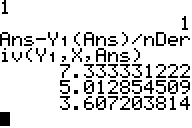
Pressing ENTER a few more times....
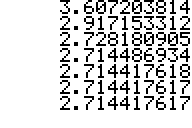
Notice how the digits stabilized? What happens if you press ENTER more times? Could you be confident in guessing that the answer to this equation is 2.7144176?
Notes on Newton's Method:
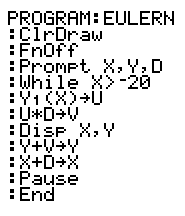
Here is a program for Euler's Method. To run this program, you must first enter the differential equation in Y1. X is the initial input, Y is the initial output, and D is the time step. Press ENTER to iterate. When you are tired of running this program, press ON.
Have suggestions? Other programs you'd like to share? Email Hilary: spriggs@math.colostate.edu